Pages

Showing posts with label C#. Show all posts

Tuesday, March 16, 2021

Steps C# Edge driver and Selenium Test Project

Create NUnit or MSTest project

In project manager, install pacakge: Microsoft.Edge.SeleniumTools

Package will install:

  • Microsoft.Edge.SeleniumTools
  • Selenium.WebDriver
  • Selenium.Support
  • DotNetSeleniumExtras.PageObjects.Core 
**PageObjects were marked obsolete - instead of  OpenQA.Selenium.Support.PageObjects use SeleniumExtras.PageObjects namespace. 

Navigate to: WebDriver - Microsoft Edge Developer

Download latest Microsoft Edge Driver.


Open downloaded Microsoft Edge Driver zip file and save msedgedriver.exe to a local drive.

Must change driver's name from msedgedriver.exe to MicrosoftWebDriver.exe. 

**Changing name is a must or an error message:
 OpenQA.Selenium.DriverServiceNotFoundException : The file C:\Selenium\EdgeDriver\msedgedriver.exe does not exist. The driver can be downloaded at https://developer.microsoft.com/en-us/microsoft-edge/tools/webdriver/

Reference EdgeDriver within Test fixture.


[Test] public void Test1() { //Open Browser IWebDriver webDriver = new EdgeDriver(@"C:\Selenium\EdgeDriver"); //Navigate to site webDriver.Navigate().GoToUrl("http://yoopergreens.com"); //Assert.Pass(); }
This post is for the purpose of my notes only and sometimes a rant.
“I invented nothing new. I simply assembled the discoveries of other men behind whom were centuries of work. Had I worked fifty or ten or even five years before, I would have failed. So it is with every new thing. Progress happens when all the factors that make for it are ready and then it is inevitable. To teach that a comparatively few men are responsible for the greatest forward steps of mankind is the worst sort of nonsense.”
Henry Ford

Sunday, May 4, 2014

Entity First - Code First - Migrations Setup

1. Created two window class project:
  • exposing the domain classes:
  • exposing the DB context classes
2. Created a MVC  4.5.1 project

1. Created two window class projects:
Domain Classes
using System;

namespace FileUpload.DomainClasses
{
    public class Media
    {
        public int Id { get; set; }
        public int MediaTypeId { get; set; }
        public string Name { get; set; }
        public string Title { get; set; }
        public string Caption { get; set; }
        public string Description { get; set; }
        public string Path { get; set; }
        public int Width { get; set; }
        public int Height { get; set; }
        public DateTime IDate { get; set; }
        public DateTime UDate { get; set; }

        public virtual MediaType MediaType { get; set; }

    }
}


namespace FileUpload.DomainClasses
{
    public class MediaType
    {
        public int Id { get; set; }
        public string Name { get; set; }
        public string Extension { get; set; }
    }
}


DB Context Class

Reaching the domain class add reference to FileUpload.DominClasses.

Within the constructor, explicitly set connection string name, which will be found within web.config.

using System.Collections.Generic;
using System.Data.Entity;
using System.Linq;

namespace FileUpload.DataLayer
{
    public class FileUploadContext : DbContext
    {
        public FileUploadContext()
            : base("name=FileUploadContextDB")
        {

        }
        public DbSet<Media> Medias { get; set; }
        public DbSet<MediaType> MediaTypes { get; set; }
    }
}


Connection String

Within web.config, added two connection strings.


  • FileUploadContext
  • FileUploadContextDB

FileUploadContext is name of the DB context class. If a connection string wasn’t explicitly set within the DB context class constructor, then a connection string with the context class name will be used.

However, the context class above has explicitly set the connection string within the constructor, so the  FileUploadContextDB connection string  is used.

web.config connectionStrings

<?xml version="1.0"?>
<configuration>
  <connectionStrings>
    <add name="FileUploadContext" connectionString="Data Source=(localdb)\Projects;Initial Catalog=FileUploadContextDB;Integrated Security=True;Connect Timeout=30;Encrypt=False;TrustServerCertificate=False" providerName="System.Data.SqlClient" />
    <add name="FileUploadContextDB" connectionString="Data Source=DEDOGS-PC\DEDOGSSQL;Initial Catalog=FileUploadContextDB;Integrated Security=False;User ID=sa;Password=moclay9330;Connect Timeout=15;Encrypt=False;TrustServerCertificate=False" providerName="System.Data.SqlClient" />
  </connectionStrings>
    <system.web>
      <compilation debug="true" targetFramework="4.5.1" />
      <httpRuntime targetFramework="4.5.1" />
    </system.web>

</configuration>


2. Created a MVC  4.5.1 project

Reaching the, add reference :


  • domain class, to FileUpload.DominClasses.
  • DB context, to FileUpload.DataLayer.

Created a Controller with a View.

namespace FileUpload_MVC.Controllers
{
    public class HomeController : Controller
    {
        public ActionResult Index()
        {
            using (var context = new FileUploadContext())
            {
                var medias = context.Medias.ToList();

            }
            return View();
        }
    }
}


On the first attempt, when a database hasn’t been setup, asking for the Medias list, Entity Framework will create a database. The database scheme reflects the context class’ names and properties.

image

Influence DB Scheme by Enabling Entity Framework Migrations Feature

Migrations track changes with your C# code.

Within the Package Manager:

1. Select FileUploadDataLayer from Default project dropdown.

pc

2. Type

PM> Enable-Migrations –ContextTypeName FileUploadContext

This will run migrations against the default project creating a Migrations folder in the FileUploadDataLayer project.
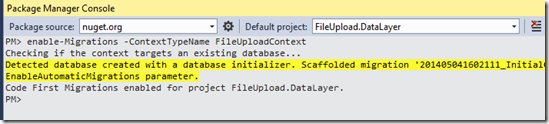
image

image

3. Within Configuration.cs, AutomaticMigrationsEnabled is set equal to false. Set AutomaticMigrationsEnabled equal to true. This will allow automatic changes to occur in the database. AutomaticMigrationsEnabled  should only be set true in production or whenever working with beginning stages.

namespace FileUpload.DataLayer.Migrations
{
    using System;
    using System.Data.Entity;
    using System.Data.Entity.Migrations;
    using System.Linq;

    internal sealed class Configuration : DbMigrationsConfiguration<FileUpload.DataLayer.FileUploadContext>
    {
        public Configuration()
        {
            AutomaticMigrationsEnabled = false;
            ContextKey = "FileUpload.DataLayer.FileUploadContext";
        }

        protected override void Seed(FileUpload.DataLayer.FileUploadContext context)
        {
            //  This method will be called after migrating to the latest version.

            //  You can use the DbSet<T>.AddOrUpdate() helper extension method 
            //  to avoid creating duplicate seed data. E.g.
            //
            //    context.People.AddOrUpdate(
            //      p => p.FullName,
            //      new Person { FullName = "Andrew Peters" },
            //      new Person { FullName = "Brice Lambson" },
            //      new Person { FullName = "Rowan Miller" }
            //    );
            //
        }
    }
}


4. Seed method allow automatically populating the database with data. Every time the database is updated it will run the seed method.

protected override void Seed(FileUpload.DataLayer.FileUploadContext context)
{
    context.MediaTypes.AddOrUpdate(mt => mt.Name,
        new MediaType { Name = "JPEG", Extension = "jpg" },
        new MediaType { Name = "GIF", Extension = "gif" },
        new MediaType { Name = "PNG", Extension = "png" }
        );
    context.Medias.AddOrUpdate(r => r.Name,
        new Media { Name = "Kirk", UDate = DateTime.Now, IDate = DateTime.Now, MediaTypeId = 1 },
        new Media { Name = "Kirk", UDate = DateTime.Now, IDate = DateTime.Now, MediaTypeId = 1 },
        new Media { Name = "Kirk", UDate = DateTime.Now, IDate = DateTime.Now, MediaTypeId = 1 }
        );
}

5. Within the Package Manager Console and FileUpload.Datalayer selected as default project, update database with this seed data.


PM> Update-Database –Verbose


image


Migration SQL Script or Update Database are two ways when handling changes when class properties are added or removed.

If AutomaticMigrationsEnabled  is set true, then by just running Update-Database from package manager will handle any scheme changes.

if AutomaticMigrationsEnabled  is set false, then must use a Migration SQL Script. A migration script was created and is located in the Migration folder.

namespace FileUpload.DataLayer.Migrations
{
    using System;
    using System.Data.Entity.Migrations;
    
    public partial class InitialCreate : DbMigration
    {
        public override void Up()
        {
            CreateTable(
                "dbo.Media",
                c => new
                    {
                        Id = c.Int(nullable: false, identity: true),
                        MediaTypeId = c.Int(nullable: false),
                        Name = c.String(),
                        Title = c.String(),
                        Caption = c.String(),
                        Description = c.String(),
                        Path = c.String(),
                        Width = c.Int(nullable: false),
                        Height = c.Int(nullable: false),
                        IDate = c.DateTime(nullable: false),
                        UDate = c.DateTime(nullable: false),
                    })
                .PrimaryKey(t => t.Id)
                .ForeignKey("dbo.MediaTypes", t => t.MediaTypeId, cascadeDelete: true)
                .Index(t => t.MediaTypeId);
            
            CreateTable(
                "dbo.MediaTypes",
                c => new
                    {
                        Id = c.Int(nullable: false, identity: true),
                        Name = c.String(),
                        Extension = c.String(),
                    })
                .PrimaryKey(t => t.Id);
            
        }
        
        public override void Down()
        {
            DropForeignKey("dbo.Media", "MediaTypeId", "dbo.MediaTypes");
            DropIndex("dbo.Media", new[] { "MediaTypeId" });
            DropTable("dbo.MediaTypes");
            DropTable("dbo.Media");
        }
    }
}


This post is for the purpose of my notes only.


“I invented nothing new. I simply assembled the discoveries of other men behind whom were centuries of work. Had I worked fifty or ten or even five years before, I would have failed. So it is with every new thing. Progress happens when all the factors that make for it are ready and then it is inevitable. To teach that a comparatively few men are responsible for the greatest forward steps of mankind is the worst sort of nonsense.”


Henry Ford

Sunday, January 6, 2013

Writing Windows Media Play List (.wpl)

I was working with a lot of media files (.mp4) located on my local drive. The media files were categorized within nth-deep sub folders. Watching the media, I was using Window Media Player, and I knew Windows Media Player can read a XML playlist, so, I wrote a small WPF application that created a Windows Play List for each folder. Interesting, while writing, I noticed one line of code can write a complete Windows Play List XML file. The line of code is below:

var mediaListFile = MakeFilePath("index.wpl", di.FullName);

XDocument xDoc = new XDocument(new XElement("smil", new XElement("head", new XElement("title", di.Name)), new XElement("body", new XElement("seq", files.Select(f => new XElement("media", new XAttribute("src", f)))))));


xDoc.Save(mediaListFile);


Using recursion, I created a collection of media files, which I wrote out to an XML file on my local drive. After creating the XML file, I was able to double-click on the file and Windows Media Player would begin. The XML file was a Windows Media Play List.

The code is below:


private TreeNode CreateDirectoryNode(DirectoryInfo di)

{

    var directoryNode = new TreeNode(di.Name);


    foreach (var directory in di.GetDirectories())

    {

        directoryNode.Nodes.Add(CreateDirectoryNode(directory));

    }


    var files = GetFiles(di);

    foreach (var file in files)

    {

        directoryNode.Nodes.Add(new TreeNode(file));

    }


    if (files.Count() > 0)

    {

        var mediaListFile = MakeFilePath("index.wpl", di.FullName);

        XDocument xDoc = new XDocument(new XElement("smil", new XElement("head", new XElement("title", di.Name)), new XElement("body", new XElement("seq", files.Select(f => new XElement("media", new XAttribute("src", f)))))));

        xDoc.Save(mediaListFile);

    }

    return directoryNode;

}


private bool FilterFiles(string file)

{

    Regex FilterFile = new Regex(@"^[\w\-. ]+(\.mp4|\.wmv|\.mov|\.avi|\.mp3)$");

    return FilterFile.IsMatch(file);

}


private string StripFile(string oldFile, string path)

{

    Regex SpecialChars = new Regex(@"[^a-zA-Z0-9._ ]+");

    if (SpecialChars.IsMatch(oldFile))

    {

        var newFile = AddFilePrefix(SpecialChars.Replace(oldFile, "_"));

        var newFilePath = MakeFilePath(newFile, path);


        if (!File.Exists(newFilePath))

        {

            var oldFilePath = MakeFilePath(oldFile, path);


            File.Copy(oldFilePath, newFilePath);

        }

        oldFile = newFile;

    }


    return oldFile;

}


private List<string> GetFiles(DirectoryInfo di)

{

    List<string> files = new List<string>();

    string stripedFile;

    string path = di.FullName;

    foreach (var file in di.GetFiles())

    {

        if (FilterFiles(file.Name))

        {

            stripedFile = StripFile(file.Name, path);

            files.Add(stripedFile);

        }

    }


    return files;

}

This post is for the purpose of my notes only.


“I invented nothing new. I simply assembled the discoveries of other men behind whom were centuries of work. Had I worked fifty or ten or even five years before, I would have failed. So it is with every new thing. Progress happens when all the factors that make for it are ready and then it is inevitable. To teach that a comparatively few men are responsible for the greatest forward steps of mankind is the worst sort of nonsense.”
Henry Ford


Saturday, August 18, 2012

Code-First: From UML Class Diagram to Creating MS SQL Database

Over the years designing web applications, I have sketched thoughts onto paper; sketching out c# classes and database table relations. I knew there were great modeling programs to assist me, but I never bothered researching. I didn’t want to learn another language or program.

However, recently I learned of .Net 4.0+ EntityFramework and UML Modeling. These two allow me to create POCO classes, DB tables, and relationships between DB tables.
It is very straight forward, which I show the process I followed below:

My Sloution Explorer shows 4 projects:

DataLayer: a C# class project exposing a DbContext layer.

Model: a UML class diagram is created and C# classes are generated from its packages .
ModelLib: where the C# classes are stored after being generating.

WebApplication1: allows to initiate the Context and possibility create database.


First, Within a black .Net 4.0 solution, I Created a new Modeling Project, I dragged out an UML class diagram and made associations:


After creating class diagram, I right clicked on each package and selected Generate Code:


Clicking Generate Code a new C# class project is created and all modeled classes from the Class Diagram classes are created and saved within a specified folder.
  • The folder’s name, where the derived classes are saved, is derived from their package’s name.
  • The project’s name takes the model project’s name and apppends “Lib”

Second, I created a C# class project with only one C# class, which I named: Context.cs. This class is the context layer and will inherit from DbContext.

From MSN (MSDN DbContext):

DbContext Class

Entity Framework 5.0 Represents a combination of the Unit-Of-Work and Repository patterns and enables you to query a database and group together changes that will then be written back to the store as a unit. DbContext is conceptually similar to ObjectContext.

DbSet<TEntity> Class

Represents a typed entity set that is used to perform create, read, update, and delete operations. DbSet is not publicly constructible and can only be created from a DbContext instance.


Lastly, I created a Web Application, and in the code behind initiated the Context class. Because of lazy loading, if I was to only initiate the Context class, no DB tables would be created. Therefore, I selected something from the Client table and converted to a List. By converted it to a list, it must make a round trip to the database, and therefore the database tables will be created.
Special Note: Reference:
  • EntityFramework
  • System.Data.Entity
  • Context namespace (dogPedalerEnityMSSQL)
This name was chosen because Entity Framework will name the database after the Context’s Namespace. If no Connection String is found in the web.config, then Entity Framework will create SQLExpress Database named dogPedalerEnityMSSQL.Context (Namespace.Class).

Complete, I found this to be great. Going from Model to Classes to Creating DB tables.
This is only for my notes, and additionally it would be great, if someone receives benefit from my notes.

Monday, August 13, 2012

Below is an example of the Captcha Control

Download the complete solution from CodePlex.

Captcha Control added to ASP.NET Page.

<li>

//Captcha Control
<cc1:CaptchaControl ID="myCaptchaControl" ClientIDMode="Static"
  Width="800"
  Height="75"
  ImageWidth="400"
  ImageHeight="75"
  Minimum="5"
  Maximum="6"
  CaptchaHandlerUrl="~/CaptchaHandler.ashx"
  Overlap="6"
  RefreshButtonPath="~/Images/refresh.png"  runat="server" />

<asp:PlaceHolder ID="PlaceHolder1" runat="server"></asp:PlaceHolder>

Please enter characters displayed above&nbsp;

<asp:TextBox ID="CaptchaCharacters" ClientIDMode="Static" Text="" Width="100" ToolTip="Enter characters displayed above" runat="server">
</asp:TextBox>

<asp:RequiredFieldValidator runat="server" ValidationGroup="RegisterGroup" ontrolToValidate="CaptchaCharacters" CssClass="field-validation-error" ErrorMessage="*Required" />

</li>
 
Captcha Control will render out a HTML image element (image displaying characters) and a HTML input element of type button (refresh button - retrieving a new set of display characters).
Below the Capthca Control, I added a Textbox, which is where the user would type the Captcha characters and will be verified once the form is submitted.


Code Behind - Verifing Captcha Characters

Note: Captcha control had been place within a CreateUserWizard control. Referencing Captcha Control, I must FindControl within CreateUserWizard control (ID="RegisterUserWizardStep").

 //CreatingUser is raised before the Memebership Provider's CreateUser. Setting LoginCancelEventArgs Cancel property equal to true, the user will not be created.
protected void RegisterUser_CreatingUser(object sender, LoginCancelEventArgs e)
{
    var err = ((Literal)GetControl("ErrorMessage"));
    var parent = err.Parent;
    err.Text = "";

    Page.Validate();
    if (!Page.IsValid)
    {
       err.Text = "Required fields are empty or incorrect information was entered.";
       e.Cancel = true;
     }
     else
     {
       //Initiate the EncodeCaptcha class
       var ec = new EncodeCaptcha(GetCaptchaKey());

       //GetCaptchaCharacters returns clear Captcha characters represented in the displayed image.
       //Test they must be equal
       if (ec.characters != GetCaptchaCharacters())
       {
          err.Text = "Characters incorrectly entered. Please reenter correct characters displayed";
          e.Cancel = true;
       }
      }
}

//Return submited Captcha characters. the characters that the user had entered.
string GetCaptchaCharacters()
{
    return ((TextBox)GetControl("CaptchaCharacters")).Text;
}

//Return encrypted Captcha character string. The encrypted string had be UrlEncode, so the return
//string is UrlDecoded.
string GetCaptchaKey()
{
    var cc = GetControl("myCaptchaControl");
    var captchaCharacters = (HiddenField)cc.FindControl("Captcha-Key");

    return HttpUtility.UrlDecode(Request[captchaCharacters.UniqueID]);
}

//Abstracted findng fields within CreateUserWizard.
Control GetControl(string value)
{
    return RegisterUserWizardStep.ContentTemplateContainer.FindControl(value);
}

Sunday, August 12, 2012

New Update Captcha Image Control

I have updated my captcha image control. I believe it is sleeker and is overall better code wise.

Initiates an asynchronous call, and the returned result, will be a single image of alphanumeric characters. Image’s characters are presented in various font sizes and or (+/-) rotated in some degree.

This project offers the complete Visual Studio 2012 solution within a compressed zip file. Download the complete solution from CodePlex.

Shown below is the Captcha type which generates randomly selected characters and draws an image displaying those specific random characters.

Two files are involved rendering the Captcha image:
  • CaptchaControl.cs and CaptchaHandler.ashx
  • CaptchaControl.cs is a generic control rendering out an image and an Image Button. The rendered image’s ImageUrl property is dynamically set, and calls CaptchaHandler.ashx with an attached query string. The query string has a particular name/value pair specifying the particular Captcha characters.
CaptchaControl.cs generates and encodes characters appending the generated string to the rendering image’s query string.

CaptchaHandler.ashx returns a HTTPResponse bitmap and is displayed on the client side webpage.


CaptchaControl Class

Namespace: Captcha.Control
Assembly: CaptchaControl.dll

Syntax
public CaptchaControl : WebControl

Constructors
CaptchaControl(): base(HtmlTextWriterTag.Fieldset) Initializes a new instance of the CaptchaControl class

Properties
string RefreshButtonPath Absolute path to the Image Button’s image
string CaptchaHandlerUrl Absolute path to the Captcha Handler
int Minimum Minimum number of characters to be selected
int Maximum Maximum number of characters to be selected
int Overlap Amount of overlap between character placement.
int ImageWidth Captcha image’s width
int ImageHeight Captcha image’s height
string CharacterSet The character domain to select from. Default character set: ABDEGHMNQRTabdeghmnqr3456789#@&$%

Monday, February 20, 2012

Regular Expressions–Removing Script tags

I have been working with the regular expression:

<+script.*?.*<\/script>


It seem to do a good job removing script tags.


Wondering if anyone knows if there is someway someone can bypass this script? Would this remove all harmful script? I have been testing, which the script tag arrangement that I tested. this regular expression successfully removed the script.


However there are a lot of different combinations, and I am wondering if anyone know a script tag combination this regular expression would fail?

Saturday, February 11, 2012

ASP.Net Forms Authentication Notes

Validates Client side validation on the server:
  • Page.Validate();
  • Page.IsValid
Forms Authentication Class – Static Methods:
Checks supplied Username and Password against those stored in the
web.config file. Returning a Boolean value indicating whether a match was found.
--if (FormsAuthentication.Authenticate(Username,Password))
--else ERROR
-- FormsAuthentication.RedirectFromLoginPage(Username, false);
  • Creates an authentication ticket for the user.
  • Encrypts the information from the authentication ticket.
  • Creates a cookie to persist the encrypted ticket information.
  • Adds the cookie to the HTTP response, sending it to the client.
  • Redirects the user to the originally requested page (which is contained in the query string
    parameter of the login page request’s URL).
Loggin Out

FormsAuthentication.SignOut(); //Removes authentication cookie
FormsAuthentication.RedirectToLoginPage(); //sends user back to the login page.

Hashing Passwords in web.config

In the <credentials /> configuration section of the <forms /> element specified in the passwordFormat attribute with valid values:.
-- Clear, MD5, SHA1

Creating a hashed password:

Using System.Web.Configuration;

FormsAuthentication.HashPasswordForStoringInConfigFile(Password,”SHA1”);

Modifying the <credentials /> section:

Configuration config = WebConfigurationManager.OpenWebConfiguration(“~/”);

ConfigurationSectionGroup csg = config.SectionGroups[“system.web”];

AuthenticationSection as = (AuthenticationSection ) ccs.Sections[“authentication”];

as.Forms.Credentials.Users.Add(new FormsAuthentionUser(Username, Password);

config.Save();
===================================================

Cooklieles Forms Authentication
Option Description:
  • UseCookies
    Forces the runtime to use cookies when working with forms authentication.
    This requires the client browser to support cookies. If the browser does
    not support cookies, forms authentication will simply not work with that
    setting activated. As it will never receive a valid authentication cookie from
    the browser, ASP.NET redirects back to the login page over and over again,
    and you end up in an endless loop of presented login pages.
  • UseUri
    If this configuration option is selected, cookies will not be used for authentication.
    Instead, the runtime encodes the forms authentication ticket into
    the request URL, and the infrastructure processes this specific portion
    of the URL for establishing the security context.
  • AutoDetect
    Results in the use of cookies if the client browser supports cookies. Otherwise,
    URL encoding of the ticket will be used. This is established through a
    probing mechanism.
  • UseDeviceProfile
    Results in the use of cookies or URL encoding based on a device profile configuration
    stored on the web server. These profiles are stored in .browser
    files in the <drive>:\<windows directory>\Microsoft.NET\Framework\
    v2.0.50215\CONFIG\Browsers directory.

Source: Asp.Net 3.5 in C# Second Edition – Apress Pro

Persistent Cookies
Setting persistent cookies:

FormsAuthentication.RedirectFromLoginPage(Username,true);

Stay alive till FormsAuthentication.SignOut() method is called.
Setting a specified cookie duration have to be set explicitly:

if FormsAuthentication.Authenticate(UserName, Password);

HttpCookie c = FormsAuthentication.GetAuthCookie(Username,true);

c.Expires = DateTime.Now.AddDays(10);

Response.Redirect(FormsAuthentication.GetRedirectUrl(Username,true));

Creating the Data Store

Setting up the membership API database tables, you can execute the following command:
aspnet_regsql -S (local)\SQLEXPRESS -E -A all -d MyDatabase

Switch Description
-S
servername Specifies the SQL Server and instance for which you want to install the
ASP.NET database tables. You can use SQL Server 7.0 or newer as an underlying
storage for the membership API.
-U username The SQL Server database user with which you want to connect to SQL Server.
This is required if you do not want to use Windows authentication to connect
only to SQL Server.
-P password If the -U switch is specified, you need to specify the password switch as well.
This is required if you do not want to use Windows authentication to connect
only to SQL Server.
-E If you don’t specify -U and -P, you automatically connect through Windows
authentication to the SQL Server instance specified in -S. With -E, you can explicitly
specify to connect through Windows authentication to the SQL Server.
-C Allows you to specify a full-fledged ODBC or OLEDB connection string for
connecting to the database.
-sqlexportonly Creates the SQL scripts for adding or removing the specified features to the
database without installing them on a dedicated SQL Server instance.
-A Installs application services. The valid options for this switch are all, m, r, p, c,
and w. The command in the previous example used the option all for installing
all application services; m is dedicated to membership. r means role services, p
means ASP.NET profiles for supporting user profiles, c stands for personalization
of web part pages, and finally, w means SQL web event provider.
-R Uninstalls application services. This switch supports the same option as -A
and uninstalls the corresponding database tables for the application services.
-d Lets you optionally specify the name of the database into which you want to
install the application services. If you don’t specify this parameter, a database
named aspnetdb is created automatically (as is the case with the <default>
option for the database in the wizard interface).

Script Description
InstallCommon.sql Installs some common tables and stored procedures necessary for both the membership and roles APIs. This includes tables for identifying ASP.NET applications that use other ASP.NET features, such as the membership API, role service, or personalization.
InstallMembership.sql Installs the database tables, stored procedures, and triggers used by the membership API. This includes tables for users, additional user properties, and stored procedures for accessing this information.
InstallRoles.sql Installs all database tables and stored procedures required for associating users with application roles.
InstallPersonalization.sql Contains DDL for creating any table and stored procedure required for creating personalized portal applications with web parts.
InstallProfile.sql Creates all the necessary tables and stored procedures for supporting ASP.NET user profiles.
InstallSqlState.sql Installs tables for persistent session state in the TEMP database of SQL Server. That means every time the SQL Server service is shut down, the session state gets lost.
InstallPersistSqlState.sql Installs tables for persistent session state in a separate ASPState database. That means the state stays alive even if the SQL Server service gets restarted.

The SqlMembershipProvider’s Properties

Source: Asp.Net 3.5 in C# Second Edition – Apress Pro

name Specifies a name for the membership provider. You can choose any name you want. You can use this name later for referencing the provider when programmatically accessing the list of configured membership providers. Furthermore, the WAT will use this name to display the provider.
applicationName String value of your choice that specifies the name of the application for which the membership provider manages users and their settings. This setting allows you to use one membership database for multiple applications. Users and roles are always associated with an application. If you do not specify an application name, a root application name called “/” will be used automatically. More details are outlined after the table.
description An optional description for the membership provider.
passwordFormat Gets or sets the format in which passwords will be stored in the underlying credential store. Valid options are Clear for clear-text password storage, Encrypted for encrypting passwords in the datastore (uses the locally configured machine key for encryption), and Hashed for hashing passwords stored in the underlying membership store.
minRequiredNonalphanumericCharacters Specifies the number of nonalphanumeric characters the password needs to have. This is an important part for the validation of the password and enables you to specify strength requirements for the passwords used by your users.
minRequiredPasswordLength Allows you to specify the minimum length of passwords for users of your application. This is also an important property for specifying password strength properties.
passwordStrengthRegularExpression If the previously mentioned properties are not sufficient for specifying password strength conditions, then you can use a regular expression for specifying the format of valid passwords. With this option you are completely flexible in terms of specifying password format criteria.
enablePasswordReset The membership API contains functionality for resetting a user’s password and optionally sending an e-mail if an SMTP server is configured for the application.
enablePasswordRetrieval When set to true, you can retrieve the password of a MembershipUser object by calling its GetPassword method. Of course, this works only if the password is not hashed.
maxInvalidPasswordAttempts Specifies the number of invalid validation attempts before the user gets locked. The default value of this setting is 5. In many cases, you’ll likely want to set this to a lower level depending on your security policy.
passwordAttemptWindow Here you can set the number of minutes in which a maximum number of invalid password or password question-answer attempts are allowed before the user is completely locked out from the application. In that case, the user gets locked out, so the administrator must activate the account again. Again, the default value is ten minutes. Depending on your security policies, you might want to lower or raise the value.
requiresQuestionAndAnswer Specifies whether the password question with an answer is required for this application. This question can be used if the user has forgotten his password. With the answer he gets the possibility of retrieving an automatically generated, new password via e-mail.
requiresUniqueEmail Specifies whether e-mail addresses must be unique for every user in the underlying membership store.

Friday, January 27, 2012

C# Event Handler / Delegates

My Notes:

Publishing Events:
Must determine what information to pass to an event within an EventArgs parameter.
Create a custom class that derives from EventArgs.

public class MyEventArgs : EventArgs
{
    public string myName { get; set; }
    public string newName { get; set; }
    public bool cancel { get; set; }
}

A custom class doesn’t have to be created. Any built-in types, which derive from EventArgs can be used, e.g. RoutedEventArgs.
.After creating a custom EventArgs class or using a built-in type deriving from EventArgs, create a public delegate.

Delegates

Delegates are similar to C pointers that reference methods from other classes.

public delegate void NameEventHandler(object sender, EventArgs e);

Above delegate expects to reference methods that return void and passes an object and an EventArgs type. These are considered the signature, and the signature is with any method, which the delegate references.

Examples:

public delegate void BtnClickEventHandler(object sender, RoutedEventArgs e);
 
private delegate bool MyEventHandler(object sender, MyEventArgs e);

  • A delegate is an anonymous function.
  • A delegate’s name can be named anything.
  • Delegates have an invocation list
  • Methods with exact signature can be added to a delegate’s invocation list, which all methods add will be raised.
Events

An event manages delegates and are type safe. Events manages adding and removing of delegates. Only methods added to an invocation list can only be removed by who added it to the list.

Events are Public
public event BtnClickEventHandler BtnClick;
 
public event MyEventHandler My;


Create a Helper Function

Create a method with a signature matching the preferred delegate.

public void OnMy(string name, string newName) 
{
//Reference a new MyEventArgs 
 
MyEventArgs myEvtArgs = new MyEventArgs();
 
myEvtArgs.myName = name;
myEvtArgs.newName = newName;
myEvtArgs.cancel = false;
 
My(this, myEvtArgs);  //Raise the event
 
}


Top to Bottom

private class MyEventArgs : EventArgs
 {
     public string myName { get; set; }
     public string newName { get; set; }
     public bool cancel { get; set; }
 }
 
 private delegate void MyEventHandler(object sender, MyEventArgs e);
 public event MyEventHandler My;
 
 public void OnMy(string name, string newName)
 {
     if (My != null)  //Insure someone is handling the event
     {
         MyEventArgs evtArgs = new MyEventArgs();
         evtArgs.myName = name;
         evtArgs.newName = newName;
         evtArgs.cancel = false;
 
         My(this, evtArgs);
     }
 }
 public MainWindow()
 {
     OnMy("Kirk", "Tom");
 }